Cyberduck
 Mountain Duck
 CLI
CLII am looking for new maintainers of the Russian (ru.lproj), Korean (ko.lproj), Thai (th.lproj), Indonesian (id.lproj), Polish (pl.lproj), Hungarian (hu.lproj) and Chinese (Traditional Characters) (zh_TW.lproj) localizations in Cyberduck. Please spread the word and let me know if you would like to contribute. The existing translations can be found at http://svn.cyberduck.ch/trunk/ (look for the *.strings files) and are already fairly complete but not updated with the latest changes. You should subscribe to the localization mailing list to receive further updates.
Reduced Redundancy Storage (RRS) option
Support for the recently announced Reduced Redundancy Storage (RRS) option to reduce costs by storing non-critical, reproducible data at lower levels of redundancy than the standard storage of Amazon S3 is now implemented in the latest nigthly snapshot build.
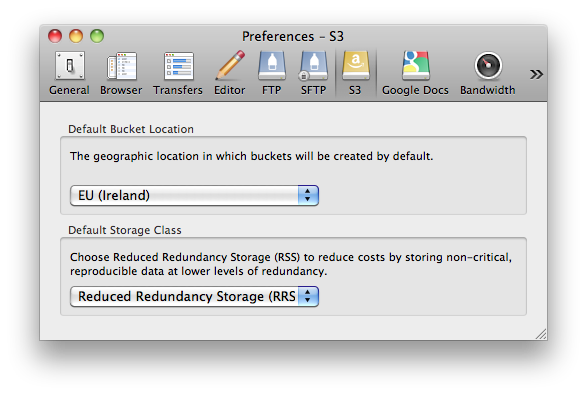
To learn more about S3 support in Cyberduck, refer to the wiki.
Asia Pacific (Singapore) Region
The latest nightly snapshot build adds support for the recently announced Asia Pacific (Singapore) location in Amazon S3. To learn more about S3 support in Cyberduck, refer to the wiki.
Slovenian Localization
The Slovenian (Slovenščina) localization by Jan Jamsek and Marko Kastelic will be available in the upcoming 3.5 release.
Google Docs
As of the current snapshot build, you can enable support for Google Docs to access your documents from within Cyberduck.
- It allows you to download documents to various export formats.
- Uploads documents to your Google Docs account for storage or choose to convert documents to Google Docs format.
- Optionally convert images to Google Docs text document using Optical Character Recognition (OCR).
Read more about Google Docs support in the Wiki. Note that this is a preliminary feature currently in development and might still have some quirks. Please report them to the issue tracker.
Georgian Localization
Supported by Innovative Systems Institute, the Georgian (ქართული ენა) localization by Nelly Metreveli is the 31st translation of Cyberduck now available in the just released 3.4.2 update. Thanks to Aiet Kolkhi for coordinating the work.
Update: A known issues with missing menu shortcuts has been reported to bugreport.apple.com
Thirtieth Localization
Welcome Serbian, the thirtieth (30) localization (including English) to Cyberduck 3.4 thanks to Milan Radivojević.
Streaming video from the Amazon CDN
The latest 3.4 release of Cyberduck now supports the configuration of Amazon CloudFront streaming distributions. A dropdown menu in the Info panel allows to choose between traditional basic HTTP distributions and the new RTMP streaming distributions supported.
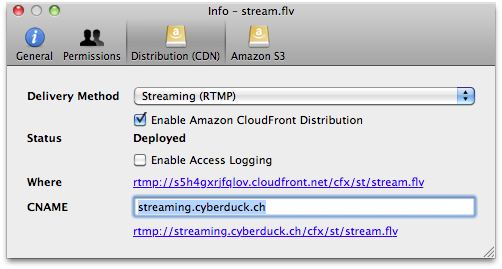
The help section will be edited with updated instructions soon altough the configuration should be straightforward. In the meantime refer to the official Amazon documentation on streaming distributions.
It probably has never been easier to distribute a video in the CDN for streaming with a click of a button.
Edit with your preferred application
Regardless of the file type, Cyberduck 3.4 allows to edit files with your preferred editor from the remote server. This allows to edit not only text files but images and other binary content as well with your preferred application directly from within Cyberduck.
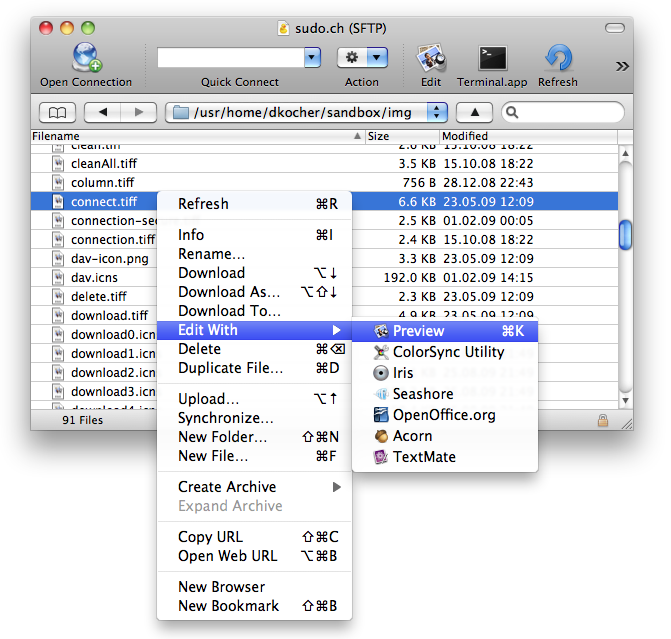
The Command-K shortcut and the edit toolbar button will always point to the application set as the default application in the Finder for a given file type. A default editor application can be choosen in the Preferences and set to override the default application that would be used when double clicking the file of a given type in the Finder.
S3 US-West (Northern California) Region
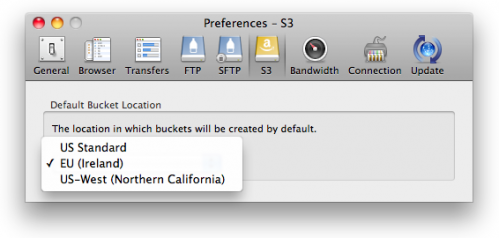
The latest nightly snapshot build adds support for the recently announced US-West location in Amazon S3.