· David Kocher · Posted in Cyberduck
This is a technical post for users that are familiar with AWS EC2.
When you are launching an EC2 instance you can assign it with an IAM role with specific permissions to AWS resources. This enables you to use security credentials on EC2 to access S3 that are temporary and rotated automatically. Refer to IAM Roles for Amazon EC2.
We have now added a login option to the current snapshot builds of 4.7 available through a connection profile that allows to connect from EC2 with Cyberduck on Windows or the CLI version on Linux instances with IAM role credentials obtained from instance metadata.
The S3 (Temporary Credentials) profile can be installed from the wiki. See Connecting with temporary access credentials from EC2. Make sure to edit the role name in the profile to match your IAM configuration.
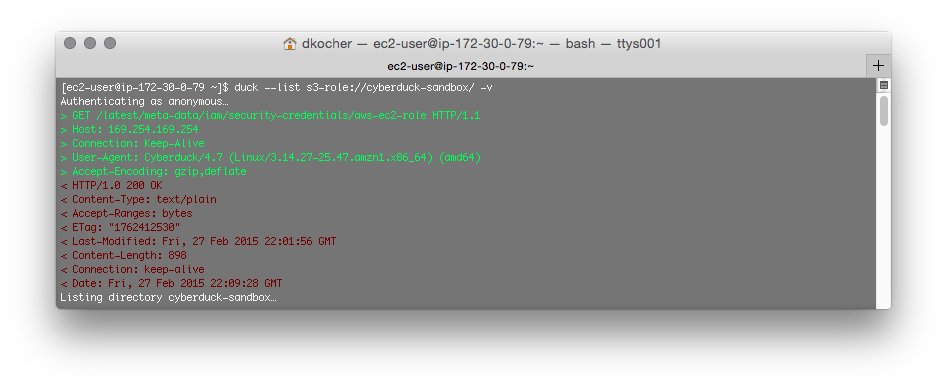
We think this will make deployments of the duck to EC2 a lot easier without the need to distribute credentials along with.
· David Kocher · Posted in Cyberduck
We have put some more love into duck, the CLI version of Cyberduck. There are now several new options to facilitate automation jobs.
--retry <count> allows to repeat failed connections.-y will dismiss all prompts and warnings with Yes by default.--throttle <bytes/second> allows to throttle transfers.plus the most interesting to improve throughput is
--parallel <connections>to open multiple concurrent connections for transfers (#1135). For downloads, larger files will be segmented into multiple parts (#4498) to transfer with multiple connections and assembled again when complete. This feature will also find its way into version 4.7 of Cyberduck.
· David Kocher · Posted in Cyberduck
We have readied a command line interface (CLI) version of Cyberduck for power users. It is named duck and runs in your shell on Linux and OS X or your Windows command line prompt.
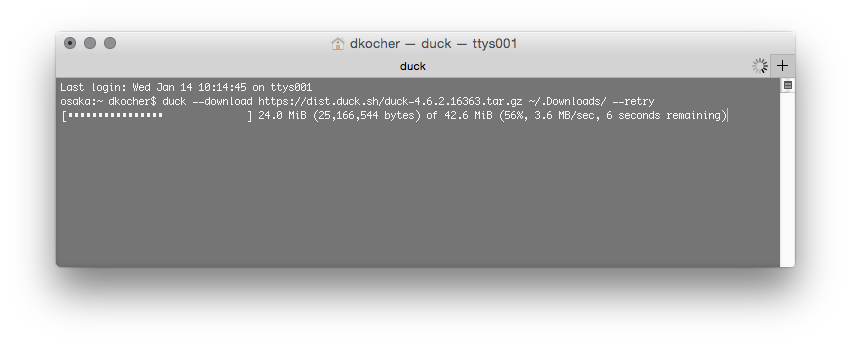
The CLI version includes the power features of Cyberduck ready to be used in scripts and automated deployments. Edit files on remote servers, download, upload and copy between servers with FTP, SFTP or WebDAV plus support for cloud storage Amazon S3 & OpenStack Swift deployments. Let’s looks at some examples what in particular duck is useful for.
Note the URI syntax protocol://container/key used for OpenStack Swift, Microsoft Azure and Amazon S3.
osaka:~ dkocher$ duck --copy ftps://dkocher@cyberduck.io/update.cyberduck.io/Cyberduck-4.6.1.zip rackspace://sandbox/Cyberduck-4.6.1.zip
FTP-SSL connection opened… Login cyberduck.io with username and password. No login credentials could be found in the Keychain. Username (dkocher): Login as dkocher Password: Cloud Files connection opened… Login identity.api.rackspacecloud.com with username and password. No login credentials could be found in the Keychain. Username (dkocher): dkocher Login as dkocher API Key: [▮▮▮▮▮▮▮▮▮▮▮▮▮▮▮▮▮▮▮ ] 37.4 MiB (39,239,680 bytes) of 55.1 MiB (67%, 694.9 KB/sec, 27 seconds remaining)
Recursively upload a folder to a remote location. An overwrite prompt will ask the action to take for existing files or can be specified using the --existing option.
osaka:duck.sh dkocher$ duck --username dkocher --upload ftps://cyberduck.io/duck.sh/ output/
FTP-SSL connection opened… Login cyberduck.io with username and password. No login credentials could be found in the Keychain. Username (dkocher): Login as dkocher Password: Login successful… The remote file duck.sh already exists. Choose what action to take:Resume Append existing files (resume)
Compare Skip files that match size, modification date or checksum (compare)
Rename existing Rename existing files with timestamp appended to filename (rename)
Overwrite Overwrite all files (overwrite)
Cancel (cancel)
Skip Skip transfer of files that already exist (skip)
Rename Rename transferred files with a timestamp appended to the filename (similar)Action [resume, compare, rename, overwrite, cancel, skip, similar]: compare
[▮▮▮▮▮▮▮▮▮▮▮▮▮▮▮▮▮▮▮▮▮▮▮▮▮▮▮▮▮▮▮] 1.0 MiB (1,067,009 bytes) of 1.0 MiB (100%, 88.6 KB/sec)
Connect using public key authentication using --identity for the private key.
osaka:~ dkocher$ duck --username dkocher --identity ~/.ssh/cyberduck.io-rsa --edit sftp://cyberduck.io/etc/httpd/vhosts.d/duck.sh.conf
Note the --region parameter that limits the output to containers that are in the Frankfurt (eu-central-1) AWS data center.
osaka:~ dkocher$ duck --username <access-key-id> --password <secret-access-key> --list s3:/// --region eu-central-1
Using the --retry option to retry the task on a networking failure.
osaka:~ dkocher$ duck --list rackspace://sandbox/ --retry Cloud Files connection opened… Login identity.api.rackspacecloud.com with username and password. No login credentials could be found in the Keychain. Username (dkocher): rackcloud Login as rackcloud API Key: Login successful… Cyberduck-4.6.1.zip
Check out the output of duck --help and the Cyberduck Wiki for more help about available commands and options.
To provide a seamless setup we provide Homebrew packages on OS X, package repositories for YUM and APT on Linux and a Chocolatey package on Windows. Besides there are regular installers for all platforms available if you use no package manager.
· David Kocher · Posted in Cyberduck
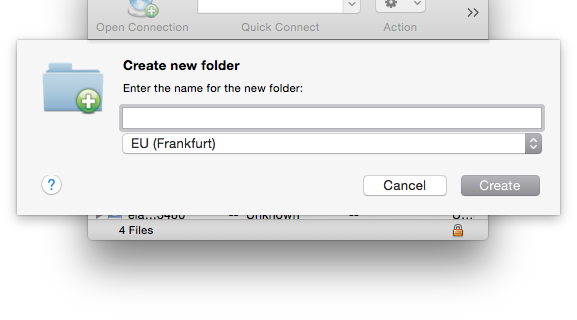
Amazon Web Services has announced its second region in Europe opened in Frankfurt. Update to the latest 4.6 beta build or later to create and access S3 buckets in this new region. Support eu-central-1 region required substantial work to implement the new AWS4-HMAC-SHA256 authentication version and SHA256 content checksum for uploads in the Jets3t S3 framework used.
· David Kocher · Posted in Cyberduck
Cyberduck 4.5 is fully compatible with OS X 10.10.

 Cyberduck
 Mountain Duck
 CLI